 Azure
AzureIt is sometimes necessary to find the physical zone that matches the logical zone assigned to your Azure subscription.
Why, you may ask? For compliance, performance, or latency reasons, it can be crucial to know where your Azure resources are physically located. It can also be important for capacity planning, to verify whether the relevant zones have enough resources to host your infrastructure.
This also helps you manage your CI/CD settings to ensure resources are deployed in zones where capacity is available.
For example, Azure Firewall currently has capacity constraints, as shown here: Azure Documentation
You can find which zone your subscription uses with the following command:
az account list-locations --query "[?availabilityZoneMappings].{availabilityZoneMappings: availabilityZoneMappings, displayName: displayName, name: name}"
This command returns a list of all regions available for your subscription, along with the availability zone mappings for each region. You can then identify the physical zone that matches the logical zone used by your Azure resources.
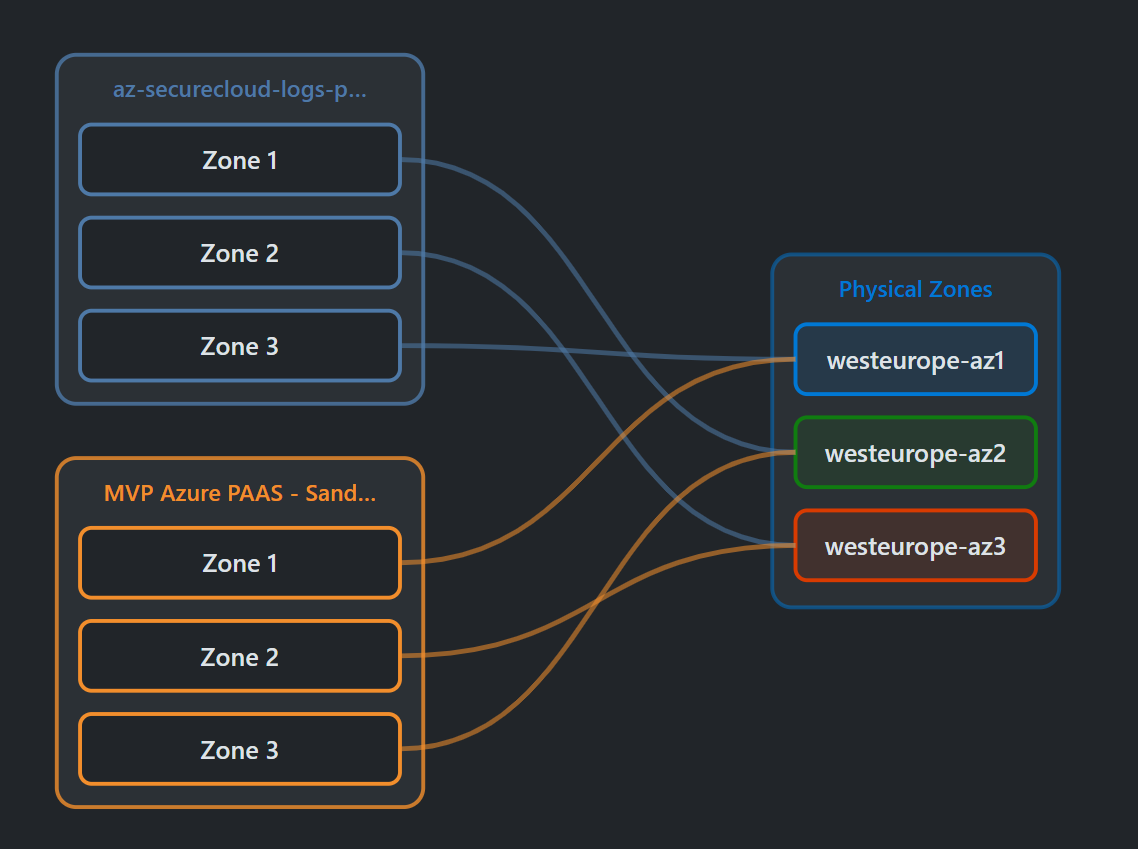
If you prefer a graphical interface, I recommend App Scout, which lets you visualize different zones and their capacities in real time. It is a very practical tool for managing your Azure resources efficiently. Here is an example for the West Europe region:
Comments
Post comment